Paradata Manager
See also
In the Extended Matrix language manual:
Paradata nodes — formal definition of Property, Extractor, Combiner and Document nodes.
Paradata NodeGroup — how paradata is grouped per stratigraphic unit (DP-60).
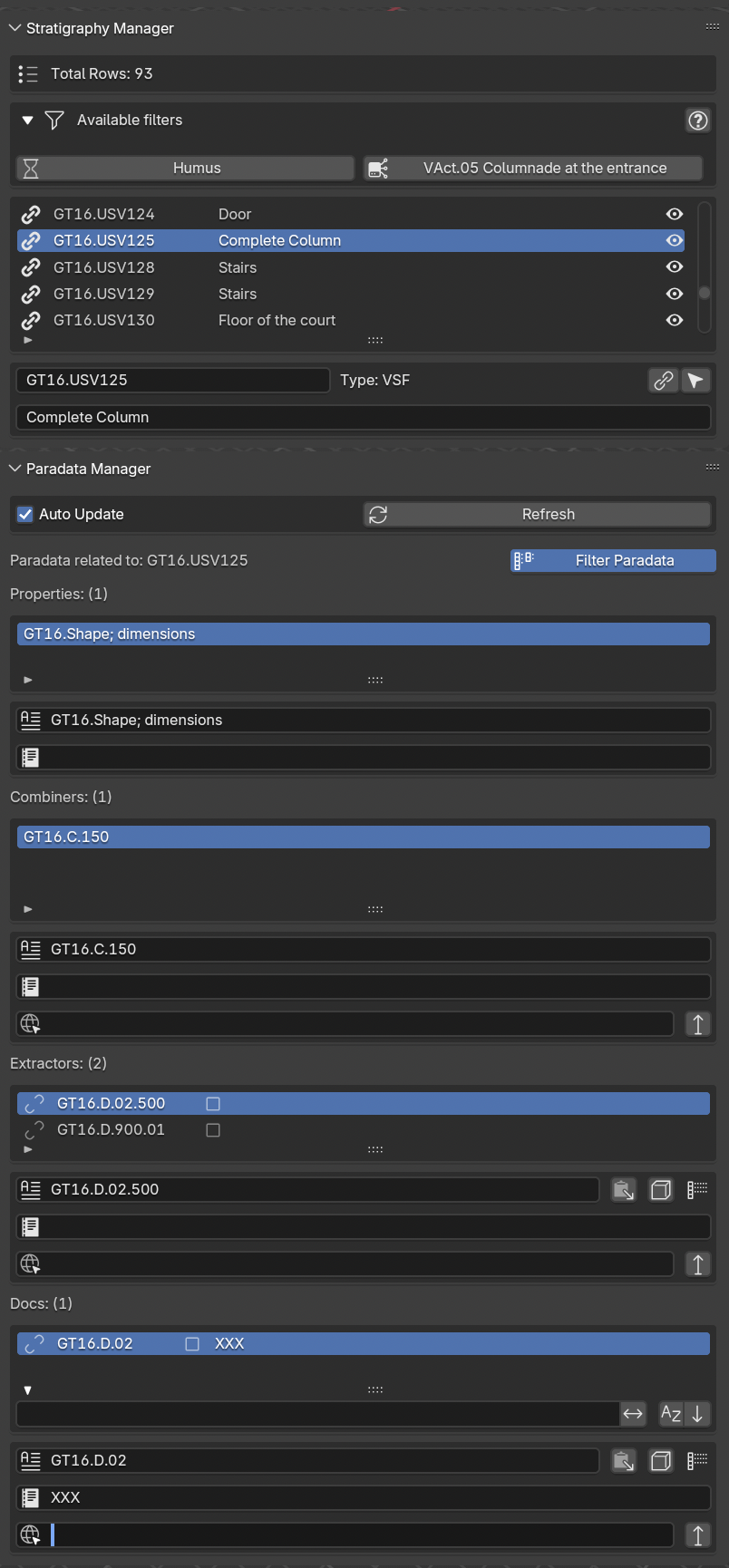
Fig. 58 Paradata Manager panel
This panel (Fig. 58) consents to explore all the information stored in every Paradata Node group of an EM graph.
The Filter Paradata button, located on the right corner of the panel, if enable, activates the possibility to explore paradata connection (from properties to documents, passing through combiner nodes, if indicated, and extractor nodes) contained in the EM.
In this specific case, within the rounded brackets located on the right side of the corresponding node (Properties, Extractors, Combiners, and Docs) a number will indicate the amount of nodes related to that precise proxy.
If Filter Paradata button is disable users will visualize all the EM nodes of the EM graph without a connection between them.
In this specific case, within the rounded brackets on the right side of the nodes (Properties, Extractors, Combiners, and Docs) a number will indicate all the paradata nodes of the EM.
NB: to follow the streaming of information user should select the Filter Paradata button.
Every section (Properties, Extractors, Combiners, and Docs) contained a list of nodes. Under every list two lines allow to read extensively both the name and the description data related to every selected Paradata node. Extractors, Combiners, and Docs nodes also presented a third lines that allow to reach the repository where the information is located.