Model Inspector
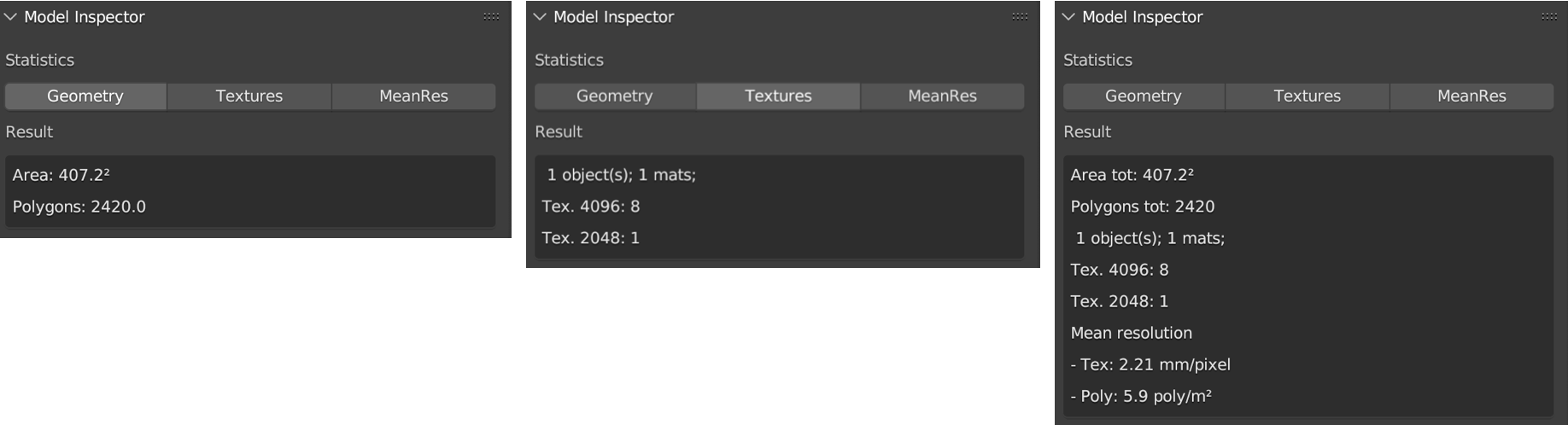
Fig. 52 Model Inspector panel (Geometry, Textures, MeanRes plus Strict/Export controls)
This panel consists of three main parts (Fig. 52): Geometry, Texture and MeanRes.
Current UI layout:
first row: analysis buttons (Geometry, Textures, MeanRes);
second row: behavior toggles (Strict mode, Prompt export after MeanRes);
third row: dedicated Export Stats button.
By clicking on the Geometry button the add-on returns some statistics on the geometry of the selected 3D object (area and number of polygons).
By clicking on the Textures button the add-on returns some statistics on the texture of the selected 3D object (number of materials, texture resolution, number of textures per resolution).
By clicking on the MeanRes button the add-on returns a summary of all statistical values (Geometry, Texture and MeanRes) concerning the selected object(s): area, polygon count, material/texture distribution, mean texture resolution (mm/pixel) and mean polygon density (\(poly/m^2\)).
Robust statistics mode
The inspector now handles meshes without materials/textures without crashing.
In default mode, unsupported data are skipped and reported in the result (for example: missing materials or missing image textures).
Strict mode
If Strict mode is enabled, Textures and MeanRes fail when required texture/material data are missing.
Use this mode for QA workflows where incomplete data must be treated as blocking.
Export behavior
MeanRes no longer forces file export by default.
Enable Prompt export after MeanRes to open the export dialog automatically after the analysis.
Use the dedicated Export Stats button to save the current statistics table to CSV on demand.