Quick Utils
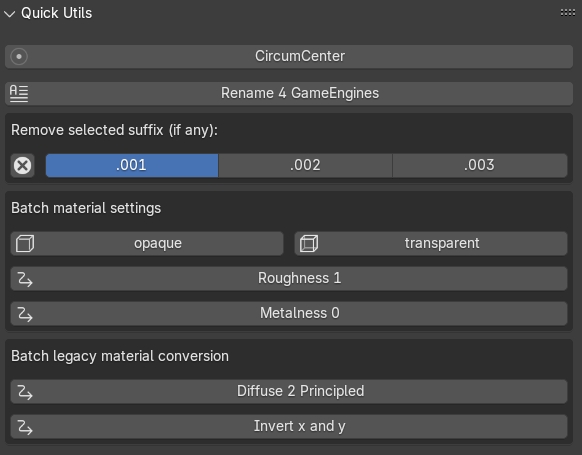
Fig. 46 Quick Utils panel
This panel (Fig. 46) contains miscellaneous utility commands for cleaning and preparing objects before downstream operations.
The Quick Utils panel includes:
Vertex Merge by Distance
Rename 4 GameEngines
Invert x and y
Remove selected suffix (if any)
Batch material settings
Batch legacy material conversion
Vertex Merge by Distance
Merges near-duplicate vertices on selected meshes.
Rename 4 GameEngines
Renames selected objects using a game-engine oriented naming convention.
Invert x and y
Swaps X and Y coordinates of selected objects while preserving Z. This is useful when total-station point datasets are imported with swapped XY axes.
Remove selected suffix (if any)
Removes selected suffixes (.001, .002, .003) from object names in batch.
Batch material settings
Changes material parameters on selected objects:
opaque: sets material Blend Mode to Opaque;
transparent: sets material Blend Mode to Alpha Blend;
Roughness 1: sets Principled BSDF roughness to 1;
Metalness 0: sets Principled BSDF metallic value to 0.
Batch legacy material conversion
The Diffuse 2 Principled command converts legacy diffuse-style materials into Principled BSDF-based materials.
Additional root-level utility panels
The following utility panels are available as separate root-level panels in the 3DSC sidebar:
Rotation Constrained
Circle from 3 Points
Alignment Orientation
Texture Smart Mapping